


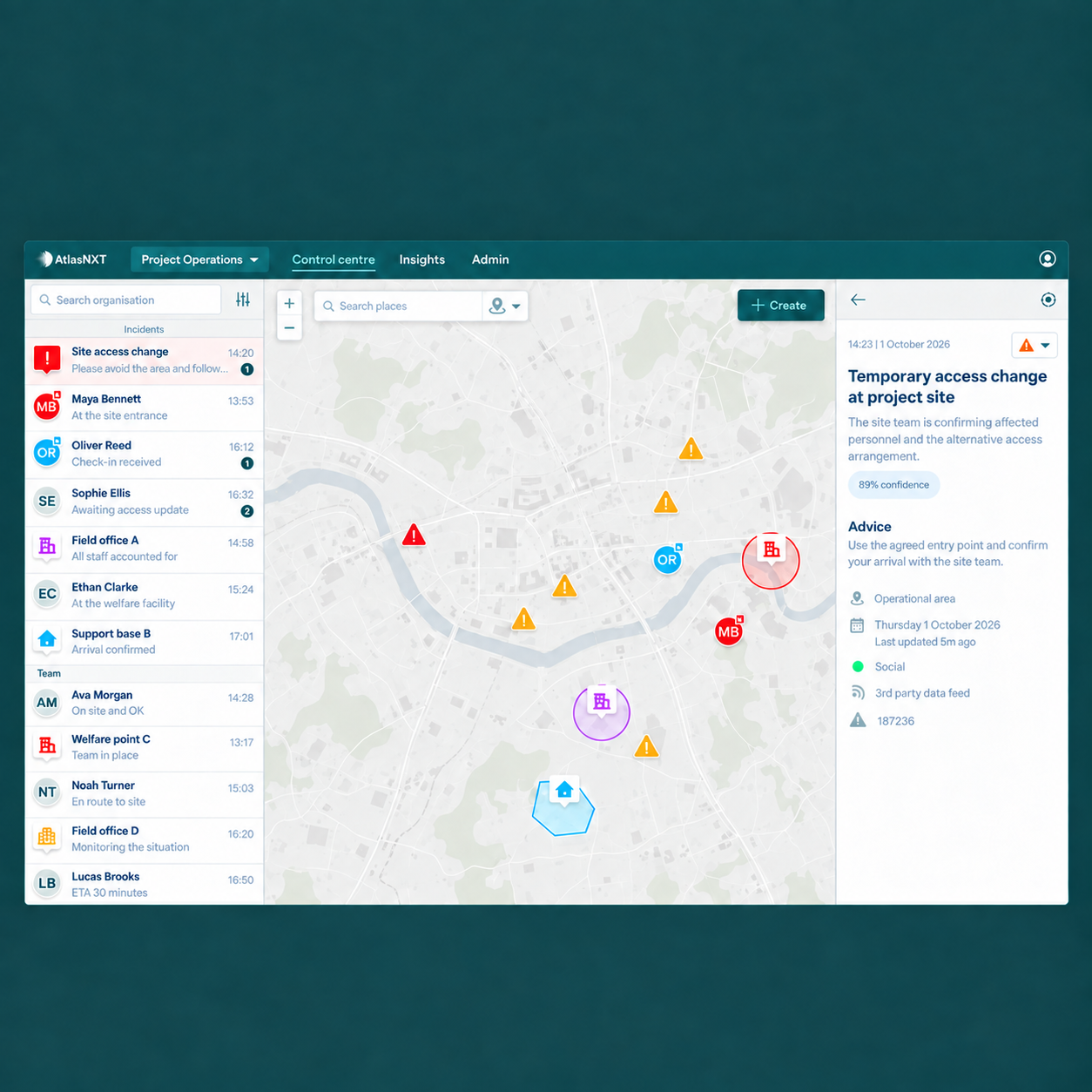

Consider a project with several teams working at once. Engineers are inspecting a remote asset. A contractor is preparing equipment at the main site. A specialist is travelling between locations. Then a local incident affects the access road, and each team learns a different part of the story.
The site supervisor knows which entrance is unavailable. The transport team knows who is travelling. Security has a wider warning. The project manager needs to decide what work can continue. A useful response connects those contributions without requiring every person to join every conversation.
AtlasNXT brings tracking, risk information, communications, and incident management into one platform. For engineering and infrastructure organisations, that means a report from the field can become a coordinated response involving the project, its contractors, and the people providing support from elsewhere.
How can employees and contractors raise an incident?
At a project entrance, a QR code can open the relevant incident form. A contractor visiting a pumping station can use a public reporting link. An employee on a remote inspection can use the AtlasNXT app to connect with the team supporting them.
AtlasNXT's incident templates allow organisations to collect information appropriate to the report. A site access problem needs a location and a description of the obstruction. A welfare concern needs enough information for someone to make contact and arrange support. The form can guide the initial account, whilst follow-up updates develop the incident as more becomes known.
Public reporting links and QR codes also let people without an AtlasNXT account raise an issue. That is important in a project environment where a delivery driver, visiting engineer, or subcontractor may be the first person to see a problem.
Make the reporting route part of the site briefing, including which route to use for an immediate emergency. HSE's construction induction guidance includes incident reporting, emergency arrangements, and information tailored to the site and the visitor.1 The useful question at the end of an induction is whether that person could actually raise a concern from the location where they will be working.
How does a report become something the project can act on?
An incident report is the start of the work. Someone still needs to establish its significance, involve the right people, and follow the response through.
In AtlasNXT, the Incident Room holds the developing timeline, communications, decisions, and assigned tasks. In the access-road example, the supervisor can confirm the affected entrance, transport can contact incoming vehicles, and the project manager can bring the relevant supervisors together to decide which activities can continue. Their updates remain attached to the same incident.
The difference is particularly useful when a report changes. An initial account might describe the site as inaccessible. A later inspection might establish that one entrance is closed but another remains available under a controlled arrangement. Recording the correction and the resulting decision gives every authorised participant something more dependable than the first message forwarded through a chat group.
The task record makes it clear who owns each outstanding action. Contacting a contractor, checking a staff member's welfare, and arranging a technical assessment can each have a named owner and a visible status.
How do you coordinate people who work for different employers?
A shared site does not mean a shared reporting line. The client's representative, principal contractor, specialist subcontractor, and engineering consultant may each have a legitimate part in the response.
OSHA's guidance for multi-employer workplaces emphasises exchanging hazard and emergency information before work starts and when conditions change, with decision-makers available to resolve coordination issues.2 Applied to a project incident, the practical task is to make each organisation's contribution clear.
For example, a subcontractor may confirm that its crew is safe, whilst the site team controls access and the client's authorised representative decides whether a particular activity may resume. The Incident Room can bring those updates together without requiring the project manager to chase three separate accounts before giving a useful briefing.
AtlasNXT's authorised access and geographical remits support oversight around defined responsibilities. A regional security team can maintain the wider picture, whilst the project team works on the local response. Start with those real responsibilities when configuring the deployment, so the information reaches people who can use it.
How does the platform help staff away from the main site?
The AtlasNXT app supports smartphone tracking, check-ins, and access to assistance. When an inspection runs late, the duty team can see the engineer's latest reported position and contact them with that context, rather than starting with only an overdue itinerary. If an incident affects the journey, the same information helps the team work out what support to arrange.
ReachScore™ makes contactability part of preparation. It combines SMS validity, notification permissions, location permissions, recent device communication, and battery level. Before a remote visit, an operator can identify a device that needs attention and help the traveller address it.
Where work takes people beyond dependable mobile coverage, compatible satellite devices can form part of the AtlasNXT deployment. Match the device, monitoring arrangement, and expected check-ins to the assignment. For vehicle-focused requirements, Track24's own IVMS, its in-vehicle monitoring system, can sit alongside AtlasNXT as part of the wider solution.
The point is continuity of support between the project gate and the places where work actually happens. A remote inspection should not become a separate, disconnected process simply because the person is outside the main compound.
How do communications stay connected to the response?
AtlasNXT's mass notifications allow the incident team to contact a defined audience, review delivery information, and follow up on replies. A revised access instruction can go to the group concerned, whilst a welfare check can focus on staff whose journeys may have been affected.
Write the message around the action required. A driver needs to know whether to wait, contact the transport coordinator, or follow an authorised revised instruction. The team receiving the replies needs somewhere to record who still requires assistance. That follow-up belongs in the Incident Room alongside the rest of the response.
As work passes between shifts, the timeline and tasks preserve the outstanding actions. HSE's handover guidance emphasises a two-way exchange and a check of the incoming person's understanding.3 The shared record gives that conversation a practical foundation: the new lead can identify the restriction still in force and the decision still awaited.
What should project leaders see in a demonstration?
Ask for an incident that crosses a real boundary: employee and contractor, main site and remote visit, or local team and central support. Follow it from the first report through a corrected update, a staff message, assigned actions, and a handover.
Then use the Incident Dashboard to review that case alongside another active incident. It provides an overview of severity, duration, recent activity, and outstanding work, helping supervisors decide where to look more closely.
The strongest demonstration is one in which the project manager can explain what has changed, who needs support, and what happens next. Book a demo to explore that sequence with AtlasNXT.